

[2025] Pass JN0-281 Exam - Real Questions and Answers
JN0-281 Exam Questions Get Updated [2025] with Correct Answers
NEW QUESTION # 39
What is an advantage of using BFD?
- A. BFD is built to handle the routing table of the entire Internet, unlike IGPS.
- B. BFD is so lightweight that each protocol will generate its own unique BFD session by default, to replace its own hello messages.
- C. BFD built to handle the routing table of the entire Internet, and can safely redistribute it into OSPF.
- D. One BFD monitoring session can be used by multiple protocols.
Answer: D
NEW QUESTION # 40
What is the primary purpose of an IRB Layer 3 interface?
- A. to provide inter-VLAN routing
- B. to provide load balancing
- C. to provide a default VLAN ID
- D. to provide port security
Answer: A
Explanation:
The primary purpose of an IRB (Integrated Routing and Bridging) interface is to enable inter-VLAN routing in a Layer 3 environment. An IRB interface in Junos combines the functionality of both Layer 2 bridging (switching) and Layer 3 routing, allowing devices in different VLANs to communicate with each other.
Step-by-Step Breakdown:
VLANs and Layer 2 Switching:
Devices within the same VLAN can communicate directly through Layer 2 switching. However, communication between devices in different VLANs requires Layer 3 routing.
IRB Interface for Inter-VLAN Routing:
The IRB interface provides a Layer 3 gateway for each VLAN, enabling routing between VLANs. Without an IRB interface, devices in different VLANs would not be able to communicate.
Configuration:
In Juniper devices, the IRB interface is configured by assigning Layer 3 IP addresses to it. These IP addresses serve as the default gateway for devices in different VLANs.
Example configuration:
set interfaces irb unit 0 family inet address 192.168.1.1/24
set vlans vlan-10 l3-interface irb.0
This allows VLAN 10 to use the IRB interface for routing.
Juniper Reference:
IRB Use Case: Inter-VLAN routing is essential in data centers where multiple VLANs are deployed, and Juniper's EX and QFX series switches support IRB configurations for this purpose.
NEW QUESTION # 41
What is a VLAN?
- A. A local network using only virtual machines
- B. A multicast domain, identified by a VLAN ID
- C. A broadcast domain, identified by a VLAN ID
- D. A broadcast domain, using only virtual machines
Answer: C
NEW QUESTION # 42
Exhibit: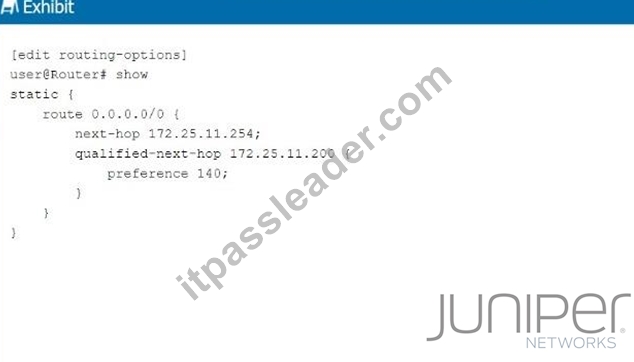
Referring to the exhibit, what is the route preference of the 172.25.11.254 next hop?
- A. 0
- B. 1
- C. 2
- D. 3
Answer: D
Explanation:
In the exhibit, we see two next-hop addresses for the default static route (0.0.0.0/0):
The first next hop is 172.25.11.254, with no specified preference.
The second next hop is 172.25.11.200, with a specified preference of 140.
Step-by-Step Breakdown:
Default Static Route Preference:
If no preference is explicitly set for a next hop in Junos, it defaults to 5 for static routes.
Determining Preference:
In this case, the next hop 172.25.11.254 does not have an explicit preference defined, so it will use the default value of 5. The second next hop has a preference of 140, which is higher, meaning it will only be used if the primary next hop is unavailable.
Juniper Reference:
Static Route Preference: In Junos, the default preference for static routes is 5, and this value is applied unless overridden by the preference parameter.
NEW QUESTION # 43
Which two statements are correct about aggregate routes and generated routes? (Choose two.)
- A. A generated route has a forwarding next hop.
- B. A generated route does not have a forwarding next hop.
- C. An aggregate route does not have a forwarding next hop.
- D. An aggregate route has a forwarding next hop.
Answer: A,C
Explanation:
Aggregate routes and generated routes are used to create summarized routes in Junos, but they behave differently in terms of forwarding.
Step-by-Step Breakdown:
Aggregate Routes:
An aggregate route summarizes a set of more specific routes, but it does not have a direct forwarding next hop. Instead, it points to the more specific routes for actual packet forwarding.
Generated Routes:
A generated route also summarizes specific routes, but it has a forwarding next hop that is determined based on the availability of contributing routes. The generated route can be used to directly forward traffic.
Juniper
Reference: Aggregate and Generated Routes: In Junos, aggregate routes rely on more specific routes for forwarding, while generated routes can forward traffic directly based on their next-hop information.
NEW QUESTION # 44
Which two statements are correct about VLAN tags? (Choose two.)
- A. VLAN tags require multiple forwarding tables.
- B. VLAN tags carry a VLAN ID and priority.
- C. VLAN tags can be inserted or removed by trunk interfaces.
- D. VLAN tags are required on access ports.
Answer: B,C
Explanation:
VLAN tags are used in Ethernet frames to identify and differentiate traffic between multiple VLANs.
They are especially important for devices like switches that handle multiple VLANs on the same physical link.
Step-by-Step Breakdown:
VLAN Tag Contents:
VLAN ID: The tag contains a 12-bit VLAN ID field that identifies the VLAN to which the frame belongs.
Priority: The tag also includes a 3-bit priority field (also known as 802.1p priority) used for QoS (Quality of Service) to prioritize traffic.
Trunk Ports and VLAN Tagging:
Trunk Ports are used to carry traffic for multiple VLANs across a single link. These interfaces insert (tag) VLAN identifiers into frames when they leave the switch and remove (untag) them when frames enter the switch.
Access Ports:
VLAN tags are typically not used on access ports (ports that connect to end devices) since those ports are configured to be part of a single VLAN, and the traffic doesn't need VLAN tags. Juniper Reference: VLAN Tagging: Juniper switches support VLAN tagging and ensure that frames are tagged or untagged as they traverse trunk or access ports, respectively.
NEW QUESTION # 45
How does OSPF calculate the best path to a particular prefix?
- A. It finds the path with the numerically lowest cost.
- B. It finds the path with the numerically lowest route preference.
- C. It finds the path with the shortest autonomous system path.
- D. It finds the path with the least number of hops.
Answer: A
Explanation:
OSPF (Open Shortest Path First) calculates the best path based on the cost of the route, which is derived from the bandwidth of the interfaces along the path.
Step-by-Step Breakdown:
OSPF Path Selection:
OSPF assigns a cost to each link, typically based on the link's bandwidth (higher bandwidth equals lower cost).
The OSPF algorithm computes the shortest path to a destination by adding the costs of all links in the path. The path with the numerically lowest total cost is chosen as the best path.
Cost Calculation:
The OSPF cost can be manually adjusted or automatically calculated using the default formula:
Cost=Reference BandwidthLink Bandwidth\text{Cost} = \frac{\text{Reference Bandwidth}}{\text{Link Bandwidth}}Cost=Link BandwidthReference Bandwidth Juniper Reference:
OSPF Best Path Selection: OSPF selects the path with the lowest cumulative cost, ensuring efficient use of higher-bandwidth links in Junos networks.
NEW QUESTION # 46
Which two statement are correct about trunk ports? (Choose two.)
- A. By default, trunk ports can transmit and receive VLAN tagged traffic.
- B. By default, trunk ports can transmit and receive untagged traffic.
- C. Trunk ports typically connect to other switches and routers.
- D. Trunk ports typically connect to end users and servers.
Answer: A,C
NEW QUESTION # 47
Referring to the exhibit, how many collision domains are present in the topology?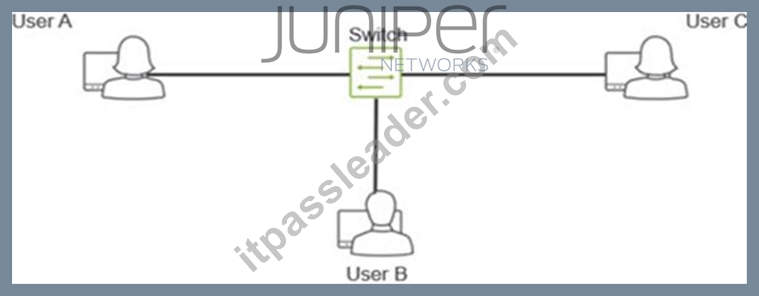
- A. 0
- B. 1
- C. 2
- D. 3
Answer: C
NEW QUESTION # 48
Exhibit: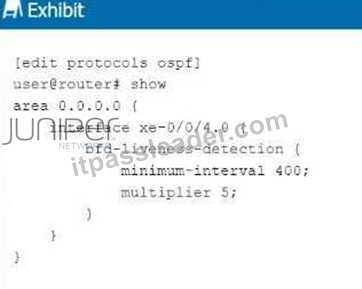
Referring to the exhibit, at which interval will the interface be considered down if no hello packets are received?
- A. 2000 seconds
- B. 2000 milliseconds
- C. 400 milliseconds
- D. 400 seconds
Answer: B
Explanation:
The exhibit shows the configuration of Bidirectional Forwarding Detection (BFD) for OSPF on interface xe-0/0/4.0, with the following parameters: minimum-interval: 400 milliseconds multiplier: 5 Step-by-Step Breakdown:
BFD Liveness Detection:
BFD is used to detect link failures at sub-second intervals, providing faster convergence times for routing protocols like OSPF. The minimum-interval is the time between BFD control packets (in milliseconds), and the multiplier indicates how many missed BFD packets trigger a failure.
Calculating Failure Detection Time:
The failure detection interval is calculated as:
Failure Interval=minimum-interval×multiplier\text{Failure Interval} = \text{minimum-interval} \times \text{multiplier}Failure Interval=minimum-interval×multiplier In this case:
400milliseconds×5=2000 milliseconds(2seconds)400 \, \text{milliseconds} \times 5 = 2000 \, \text{milliseconds} (2 seconds)400milliseconds×5=2000milliseconds(2seconds) Conclusion:
If no BFD control packets are received within 2000 milliseconds (2 seconds), the interface will be considered down, triggering OSPF to recalculate routes. Juniper Reference: BFD Configuration: BFD parameters such as minimum-interval and multiplier are used to fine-tune the failure detection time for faster convergence.
NEW QUESTION # 49
When troubleshooting issues with static routes, what is a key factor to check first?
- A. The number of aggregate routes configured
- B. The correctness of the specified next-hop addresses
- C. The speed of the router's CPU
- D. If the routing table has enough memory
Answer: B
NEW QUESTION # 50
Which two statements are correct about aggregated Ethernet bundles? (Choose two.)
- A. You must specify which interfaces are members of a specific aggregated Ethernet bundle.
- B. You must purchase a services license for the chassis to support aggregate Ethernet interfaces.
- C. You must enable the chassis to support aggregated Ethernet interfaces.
- D. You must enable LACP when configuring aggregated Ethernet bundles.
Answer: A,C
NEW QUESTION # 51
You want to enable a Junos device to support aggregated Ethernet interfaces. In this scenario, which configuration hierarchy would you use?
- A. [edit interfaces]
- B. [edit system]
- C. [edit switch-options]
- D. [edit chassis]
Answer: D
Explanation:
To configure aggregated Ethernet (AE) interfaces on a Junos device, the configuration is done under the [edit chassis] hierarchy.
Step-by-Step Breakdown:
Chassis Configuration:
The chassis configuration is responsible for enabling the hardware to support Link Aggregation Groups (LAGs), allowing multiple physical interfaces to be bundled into a single logical interface for load balancing and redundancy.
Command Example:
set chassis aggregated-devices ethernet device-count <number>
This command enables a specific number of aggregated Ethernet interfaces on the device.
Juniper
Reference: LAG Configuration in Junos: The chassis hierarchy is used to allocate and manage hardware resources for aggregated Ethernet interfaces in Juniper devices.
NEW QUESTION # 52
Which statement is correct about per-flow load balancing?
- A. Packets associated with the same flow are sent through the same egress port.
- B. Packets associated with the same flow are sent through different egress ports.
- C. The packets are guaranteed to arrive at their destination in a different order in which they were sent.
- D. The packets are guaranteed to arrive at their destination in the same order in which they were sent.
Answer: A
Explanation:
Per-flow load balancing ensures that packets within the same flow are always forwarded over the same path, ensuring that packet order is preserved.
Step-by-Step Breakdown:
Flow Definition:
A flow is typically defined by a combination of packet attributes like source/destination IP, source/destination port, and protocol type. Packets that belong to the same flow are routed over the same path to avoid reordering.
Per-Flow Behavior:
In per-flow load balancing, the hashing algorithm ensures that all packets in a particular flow use the same egress port, maintaining order across the network.
Juniper Reference:
Load Balancing in Juniper: This method ensures that flows are balanced across multiple paths while preventing packet reordering within a single flow.
NEW QUESTION # 53
What are two reasons why you would deploy an IP fabric instead of a traditional Layer 2 network in a data center? (Choose two.)
- A. IP fabrics are better suited to smaller networks where scale is less important.
- B. Layer 3 networks support load balancing.
- C. Layer 2 networks only support a single broadcast domain.
- D. Layer 2 networks are susceptible to loops.
Answer: B,D
Explanation:
IP fabrics are Layer 3-centric network designs often used in data centers due to their scalability, efficient routing, and loop-free architecture.
Step-by-Step Breakdown:
Layer 3 Load Balancing:
IP fabrics use Equal-Cost Multipath (ECMP) to distribute traffic across multiple paths, providing effective load balancing and improving bandwidth utilization. This capability is absent in traditional Layer 2 networks, which do not support ECMP for routing decisions.
Layer 2 Loops:
Layer 2 networks are prone to loops because of the lack of TTL (Time-to-Live) mechanisms. Spanning Tree Protocol (STP) is required to prevent loops, but it can introduce inefficiencies by blocking links. In contrast, IP fabrics based on Layer 3 protocols are loop-free and do not need STP.
Juniper Reference:
IP Fabric: Juniper's IP fabric solutions offer efficient Layer 3 routing with built-in load balancing and loop prevention, making them ideal for modern data center architectures.
NEW QUESTION # 54
In the context of Link Aggregation Groups (LAG), what is the primary purpose of LACP?
- A. To dynamically manage the bundling of several physical ports
- B. To provide a method for encrypting data packets
- C. To reduce the speed of data transfer
- D. To increase the error rate in data transmission
Answer: A
NEW QUESTION # 55
You are configuring an aggregate route. In this scenario, which two statements are correct? (Choose two.)
- A. Reject will silently drop the traffic.
- B. Discard will silently drop the traffic.
- C. Reject will send an ICMP Destination Unreachable message back to the sender.
- D. Discard will send an ICMP Destination Unreachable message back to the sender.
Answer: B,C
Explanation:
When configuring an aggregate route, you have options for how to handle traffic that matches the route but does not match any more specific route in the routing table. Two actions can be taken: discard and reject.
Step-by-Step Breakdown:
Discard:
The discard option will silently drop packets that match the aggregate route. No notification is sent to the sender, and the packet is simply dropped.
Reject:
The reject option will drop the packet and also send an ICMP Destination Unreachable message back to the sender. This informs the sender that the packet could not be delivered because there is no specific route available.
Juniper Reference:
Aggregate Routes: The reject and discard next-hop options provide different levels of feedback when packets cannot be routed, and they can be used to control how unreachable destinations are handled.
NEW QUESTION # 56
Which two statements are correct about rules for EBGP and IBGP? (Choose two.)
- A. EBGP peers have a TTL of 1, while IBGP peers have a TTL of 255.
- B. EBGP routes are more preferred than IBGP routes.
- C. IBGP routes are more preferred than EBGP routes.
- D. EBGP peers have a TTL of 255, while IBGP peers have a TTL of 1.
Answer: A,B
Explanation:
EBGP (External BGP) and IBGP (Internal BGP) operate with different rules due to the nature of their relationships.
Step-by-Step Breakdown:
TTL Differences:
EBGP: By default, EBGP peers have a TTL of 1, meaning they must be directly connected, or the TTL needs to be manually increased for multihop EBGP.
IBGP: IBGP peers within the same AS have a TTL of 255, as they are expected to communicate over multiple hops within the AS.
Preference for EBGP Routes:
Routes learned via EBGP are typically preferred over IBGP routes. This is because EBGP routes are considered more reliable since they originate outside the AS, while IBGP routes are internal. Juniper Reference: BGP Configuration: The different handling of TTL and route preferences between EBGP and IBGP ensures proper route selection and security within Junos-based networks.
NEW QUESTION # 57
Exhibit: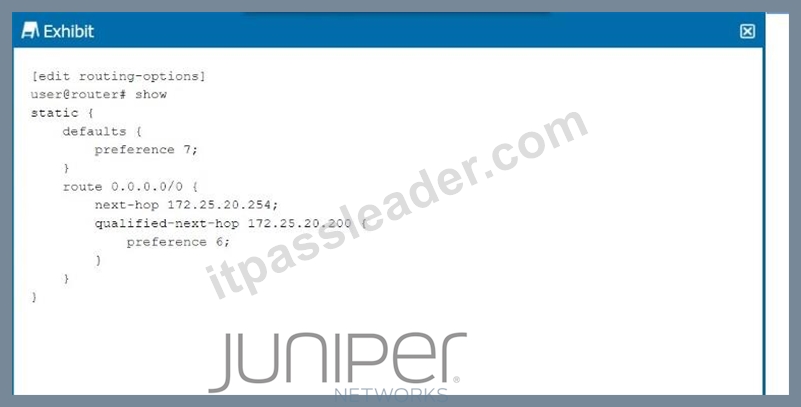
Referring to the exhibit, which next hop will be preferred in the routing table?
- A. Next hop IP address 172.25.20.254 will be preferred.
- B. Next hop IP address 172.25.20.200 will be preferred.
- C. Both next hops will be preferred.
- D. Neither next hop will be preferred.
Answer: B
Explanation:
In the exhibit, we see a static route configuration with two possible next hops for the default route (0.0.0.0/0):
next-hop 172.25.20.254 with the default preference of 7.
qualified-next-hop 172.25.20.200 with a preference of 6.
Step-by-Step Breakdown:
Preference Value:
In Junos OS, the preference value is used to determine which route should be preferred in the routing table. The lower the preference value, the higher the priority for the route.
Comparison:
In this case:
The next hop 172.25.20.254 has a preference of 7.
The qualified-next-hop 172.25.20.200 has a preference of 6.
Preferred Next Hop:
Since 172.25.20.200 has a lower preference (6) compared to 172.25.20.254 (7), it will be the preferred next hop in the routing table, assuming both next hops are reachable.
Juniper Reference:
Qualified Next Hop: In Junos, static routes with multiple next-hop options are selected based on the preference value, with the lower value being preferred.
NEW QUESTION # 58
When considering bidirectional forwarding detection, which two statements are correct? (Choose two.)
- A. The BFD operation always consists of minimum intervals and multipliers.
- B. You can configure BFD per interface within the protocol stanza.
- C. The BFD default minimum interval is 3.
- D. The BFD default multiplier is 5.
Answer: A,B
Explanation:
Bidirectional Forwarding Detection (BFD) is a protocol used to detect faults in the forwarding path between two routers. It provides rapid failure detection, enhancing the performance of routing protocols like OSPF, BGP, and IS-IS.
Step-by-Step Breakdown:
Per Interface Configuration:
BFD can be configured on a per-interface basis within the protocol stanza (e.g., OSPF, BGP). This allows granular control over where BFD is enabled and the failure detection intervals for specific interfaces.
Minimum Interval and Multiplier:
BFD uses a minimum interval (the time between BFD control packets) and a multiplier (the number of missed packets before the path is declared down). The combination of these two defines the detection time for failures.
Juniper Reference:
BFD Configuration: In Juniper, BFD is configurable within routing protocol stanzas, with the failure detection mechanism always based on minimum intervals and multipliers.
NEW QUESTION # 59
When troubleshooting an OSPF neighborship, you notice that the router stopped at the ExStart state.
What is the cause of this result?
- A. There is an interval timing mismatch.
- B. The priority is set to 255.
- C. There is an area ID mismatch.
- D. There is an MTU mismatch.
Answer: D
Explanation:
When an OSPF (Open Shortest Path First) neighborship is stuck in the ExStart state, it usually points to a mismatch in Maximum Transmission Unit (MTU) settings between two routers trying to establish the adjacency. The ExStart state is where OSPF routers negotiate the master-slave relationship and exchange DBD (Database Description) packets.
Step-by-Step Breakdown:
OSPF Neighbor States: OSPF goes through several states to establish an adjacency with a neighbor:
Down: No hello packets have been received.
Init: Hello packets are received, but bidirectional communication isn't confirmed.
2-Way: Bidirectional communication is established.
ExStart: The routers are negotiating who will be the master and who will be the slave, and begin to exchange DBD packets.
Exchange: The routers start exchanging the database information.
Loading: The routers process the Link-State Advertisements (LSAs).
Full: The adjacency is fully established.
MTU Mismatch Issue:
During the ExStart state, both OSPF routers must agree on their MTU values. If there is an MTU mismatch between the two routers, OSPF neighbors will fail to move from the ExStart to the Exchange state. The router with the larger MTU setting will not accept DBD packets from the router with a smaller MTU because the packets may exceed the smaller MTU size.
In Juniper devices, this behavior can be identified by examining the MTU settings using the show interfaces command and ensuring both routers have matching MTU configurations. To resolve this issue, either match the MTU settings on both routers or configure OSPF to ignore MTU mismatches using the command set protocols ospf ignore-mtu.
Juniper
Reference: Junos Command: show ospf neighbor helps diagnose neighbor states.
MTU Adjustment: set interfaces <interface-name> mtu <size> can be used to set the MTU values correctly.
NEW QUESTION # 60
You have configured a load balancing policy.
Which statement is correct about applying the policy?
- A. The policy is applied as an import policy under routing-options forwarding table.
- B. The policy is applied as an import policy under the routing protocol's hierarchy.
- C. The policy is applied as an export policy under routing-options forwarding table.
- D. The policy is applied as an export policy under the routing protocol's hierarchy.
Answer: C
NEW QUESTION # 61
......
Practice JN0-281 Questions With Certification guide Q&A from Training Expert ITPassLeader: https://troytec.itpassleader.com/Juniper/JN0-281-dumps-pass-exam.html