

New 2026 Realistic FCP_FSM_AN-7.2 Dumps Test Engine Exam Questions in here
Updated Official licence for FCP_FSM_AN-7.2 Certified by FCP_FSM_AN-7.2 Dumps PDF
NEW QUESTION # 29
Which two data areas can you use for user and entity behavior analytics (UEBA) machine learning models? (Choose two.)
- A. resources
- B. location
- C. network
- D. process
Answer: B,C
Explanation:
FortiSIEM's UEBA models analyze user and entity behavior by correlating data such as location (for detecting unusual logins or access patterns) and network activity (for identifying abnormal communication or traffic behaviors). These data areas enable the system to build baseline profiles and detect anomalies indicating potential insider threats or compromised accounts.
NEW QUESTION # 30
Refer to the exhibit.
An analyst is troubleshooting the rule shown in the exhibit. It is not generating any incidents, but the filter parameters are generating events on the Analytics tab.
What is wrong with the rule conditions?
- A. The Group By attributes restricts which events are counted.
- B. The Event Type refers to a CMDB lookup and should be an Event lookup.
- C. The Aggregate attribute is too restrictive.
- D. The Destination Host Name value is not fully qualified.
Answer: A
Explanation:
The Group By attributes - Destination IP and User - cause the aggregation (COUNT(Source IP) >= 2) to apply within each unique combination of those groupings. This restricts the count calculation and can prevent the rule from triggering incidents, even if matching events exist in the Analytics tab.
NEW QUESTION # 31
Refer to the exhibit.
What is the Group: FortiSIEM Analysts value referring to?
- A. CMDB user group
- B. LDAP user group
- C. FortiSIEM organization group
- D. Windows Active Directory user group
Answer: A
Explanation:
In FortiSIEM, the value Group: FortiSIEM Analysts under the User attribute refers to a CMDB user group. These groups are defined within FortiSIEM's CMDB and used to logically organize users for analytics, correlation rules, and reporting.
NEW QUESTION # 32
Refer to the exhibit.
As shown in the exhibit, why are some of the fields highlighted in red?
- A. No RAW Event Log attribute information is available.
- B. The Event Receive Time attribute is not available for logs.
- C. The attribute COUNT(Matched Events) is an invalid expression.
- D. Unique values cannot be grouped B.
Answer: D
Explanation:
The fields are highlighted in red because unique values such as Event Receive Time and Raw Event Log cannot be used in group-by operations. Grouping requires aggregatable or consistent values across events, while these fields are unique to each event, making them incompatible for grouping.
NEW QUESTION # 33
Refer to the exhibit.
Which two lookup types can you reference as the subquery in a nested analytics query? (Choose two.)
- A. SNMP Query
- B. Event Query
- C. CMDB Query
- D. LDAP Query
Answer: A,B
Explanation:
In FortiSIEM nested analytics queries, you can reference both CMDB Queries and Event Queries as subqueries. These allow correlation between CMDB data and event data for advanced detection use cases.
NEW QUESTION # 34
You need a model for predicting a target field based on other fields in a dataset and then trigger an anomaly if the value does not match the prediction. Which machine learning algorithm will build this type of model?
- A. Regression
- B. Regression
- C. Clustering
- D. Forecasting
Answer: A
Explanation:
A Regression algorithm is used when predicting a continuous or numeric target field based on other features in the dataset. In FortiSIEM, regression-based machine learning models establish expected values, and an anomaly is triggered when the actual observed value significantly deviates from the regression prediction.
NEW QUESTION # 35
Refer to the exhibit.
An analyst is troubleshooting the rule shown in the exhibit. It is not generating any incidents, but the filter parameters are generating events on the Analytics tab.
What is wrong with the rule conditions?
- A. The Group By attributes restricts which events are counted.
- B. The Event Type refers to a CMDB lookup and should be an Event lookup.
- C. The Aggregate attribute is too restrictive.
- D. The Destination Host Name value is not fully qualified.
Answer: A
Explanation:
The Group By attributes - Destination IP and User - cause the aggregation (COUNT(Source IP) >= 2) to apply within each unique combination of those groupings. This restricts the count calculation and can prevent the rule from triggering incidents, even if matching events exist in the Analytics tab.
NEW QUESTION # 36
Refer to the exhibit.
An analyst is trying to identify an issue using an expression based on the Expression Builder settings shown in the exhibit; however, the error message shown in the exhibit indicates that the expression is invalid.
What is the correct syntax to create an expression that generates a total count of matched events?
- A. Matched Events COUNT()
- B. Matched Events (COUNT)
- C. COUNT(Matched Events)
- D. (COUNT) Matched Events
Answer: C
Explanation:
The correct syntax is COUNT(Matched Events) - with proper capitalization and spacing - to generate a total count of matched events. The error in the exhibit likely stems from a formatting issue (e.g., lowercase count() or incorrect spacing), not the logical structure of the expression.
NEW QUESTION # 37
Refer to the exhibit.
As shown in the exhibit, why are some of the fields highlighted in red?
- A. No RAW Event Log attribute information is available.
- B. Unique values cannot be grouped.
- C. The Event Receive Time attribute is not available for logs.
- D. The attribute COUNT(Matched Events) is an invalid expression.
Answer: B
Explanation:
The fields are highlighted in red because unique values such as Event Receive Time and Raw Event Log cannot be used in group-by operations. Grouping requires aggregatable or consistent values across events, while these fields are unique to each event, making them incompatible for grouping.
NEW QUESTION # 38
Refer to the exhibit.
A FortiSIEM analyst is investigating an issue by examining events related to two destination IP addresses. However, the analyst is not getting any results from the search.
Based on the selected filters shown in the exhibit, why is the search returning no results?
- A. The wrong boolean operator is selected in the Next column.
- B. An invalid IP address is typed in the Value column.
- C. Parentheses are missing between the two items.
- D. The wrong option is selected in the Operator column.
Answer: A
Explanation:
The boolean operator between the two destination IP filters is set to AND, meaning FortiSIEM searches for events where the Destination IP is simultaneously 10.10.10.1 and 192.168.1.1, which is impossible. Changing the operator to OR would return events matching either IP address, producing the expected results.
NEW QUESTION # 39
Refer to the exhibit. If you group the events by Reporting IP, Event Type, and User attributes, how many results will FortiSIEM display?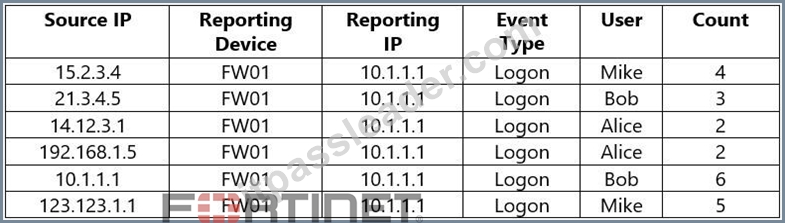
- A. Three
- B. Two
- C. Four
- D. Five
Answer: A
Explanation:
When grouped by Reporting IP, Event Type, and User, FortiSIEM consolidates rows sharing the same values for these attributes.
Reporting IP: all are 10.1.1.1
Event Type: all are Logon
Users: Mike, Bob, and Alice
Thus, FortiSIEM will display three results, one for each user.
NEW QUESTION # 40
When selecting multiple rules at once on FortiSIEM, what actions can you perform?
- A. You can change the severity of multiple rules, and activate or deactivate them.
- B. You can only change the severity of multiple rules.
- C. You can only view, edit, and activate a single rule at one time.
- D. You can only activate or deactivate multiple rules.
Answer: A
Explanation:
In FortiSIEM, when multiple rules are selected, you can change their severity levels and activate or deactivate them simultaneously. This bulk action capability simplifies rule management by allowing analysts to apply configuration updates or operational changes across multiple correlation rules efficiently.
NEW QUESTION # 41
From which two sources can you import data to train FortiSIEM machine learning? (Choose two.)
- A. CSV files
- B. FortiSIEM reports
- C. Syslog archives
- D. SQL database
Answer: A,B
NEW QUESTION # 42
Which two settings must you configure to allow FortiSIEM to apply tags to devices in FortiClient EMS? (Choose two.)
- A. Remediation script configured
- B. FortiEMS API credentials defined on FortiSIEM
- C. ZTNA tags defined on FortiSIEM
- D. FortiSIEM API credentials defined on FortiEMS\
Answer: B,D
Explanation:
To allow FortiSIEM to apply tags to devices in FortiClient EMS, FortiEMS API credentials must be defined on FortiSIEM to enable communication with EMS, and FortiSIEM API credentials must be defined on FortiEMS to allow EMS to accept tagging instructions from FortiSIEM. This bidirectional API trust is essential for tag application.
NEW QUESTION # 43
Refer to the exhibit.
Which section contains the subpattern configuration that determines how many matching events are needed to trigger the rule?
- A. Group By
- B. Aggregate
- C. Filters
- D. Actions
Answer: B
Explanation:
The Aggregate section contains the condition COUNT(Matched Events) >= 1, which defines how many events must match the filter criteria for the rule to trigger. This is the subpattern configuration that determines the event threshold.
NEW QUESTION # 44
In FortiSIEM, which database stores discovery information?
- A. Event DB
- B. CMDB
- C. Profile DB
- D. SVN DB
Answer: B
Explanation:
FortiSIEM stores discovery information - such as device attributes, IPs, roles, and relationships - in the Configuration Management Database (CMDB). The CMDB maintains an up-to-date inventory of all discovered assets, serving as the central repository for device and infrastructure configuration data.
NEW QUESTION # 45
Refer to the exhibit.
If you group the events by User, Source IP, and Count attributes, how many results will FortiSIEM display?
- A. Two
- B. Six
- C. Three
- D. Four
- E. Five
Answer: B
Explanation:
Grouping by User, Source IP, and Count means that each unique combination of those three attributes will be treated as a separate result. In the table, all six rows have distinct combinations of User, Source IP, and Count - so FortiSIEM will display 6 results.
NEW QUESTION # 46
Which analytics search can be used to apply a user and entity behavior analytics (UEBA) tag to an event for a failed login by the user JSmith?
- A. User IS jsmith
- B. Username NOT END WITH jsmith
- C. User = smith
- D. Username CONTAIN smit
Answer: A
Explanation:
The correct syntax to match an exact username in FortiSIEM analytics search is User IS jsmith. This ensures that the UEBA tag is applied only when the event is specifically tied to the user "jsmith", which is required for accurate behavioral analytics.
NEW QUESTION # 47
Refer to the exhibits.
An analyst is troubleshooting why the rule shown in the exhibit is generating incidents for successful RDP connections.
Given the rule conditions and subpatterns, what is causing the problem?
- A. The subpattern relationship RDP_Connection:User = Failed_Logon:User will never match.
- B. The Boolean between the subpatterns is incorrect.
- C. The Failed_Logon subpattern is not checking for failed authentications.
- D. The condition time window is too short.
Answer: B
Explanation:
The rule condition combines the two subpatterns with an OR, so the rule fires when either an RDP_Connection event or a Failed_Logon pattern occurs. This causes incidents to be generated for successful RDP connections even when no failed logons are present. The subpatterns should be combined with AND so that incidents are created only when both the RDP connection and the failed logons occur together.
NEW QUESTION # 48
Refer to the exhibit.
If a rule containing the automation policy shown in the exhibit triggers, what will happen?
- A. Associated source IP addresses will be blocked on devices in the Aviation organization.
- B. Associated source IP addresses will be blocked on all FortiGate firewalls.
- C. Associated source IP addresses will be blocked on two FortiGate firewalls.
- D. Associated source IP addresses will be blocked on devices in the Network CMDB group.
Answer: C
Explanation:
The automation policy is configured to run a remediation script named "Fortinet FortiOS - Block Source IP FortiOS via API". It specifies enforcement on two FortiGate devices: FortiGate508 and FortiGate90D. Therefore, associated source IP addresses will be blocked on those two FortiGate firewalls only.
NEW QUESTION # 49
Refer to the exhibit.
What will happen when a device being analyzed by the machine learning configuration shown in the exhibit has a consistently high memory utilization?
- A. FortiSIEM will trigger an incident for high memory utilization.
- B. FortiSIEM will update the regression tables for memory utilization, and average sent and received bytes.
- C. FortiSIEM will update the model with a higher memory utilization average value.
- D. FortiSIEM will lower the CPU utilization trigger requirement for CPU utilization.
Answer: C
Explanation:
In the configuration shown, FortiSIEM uses Memory Util, Sent Bytes, and Received Bytes as input features to predict CPU Utilization via a regression model. If a device shows consistently high memory utilization, the model will incorporate that into its training data and update itself with a higher average value for memory utilization, influencing future CPU utilization predictions.
NEW QUESTION # 50
Refer to the exhibit.
What will happen when a device being analyzed by the machine learning configuration shown in the exhibit has a consistently high memory utilization?
- A. FortiSIEM will trigger an incident for high memory utilization.
- B. FortiSIEM will update the regression tables for memory utilization, and average sent and received bytes.
- C. FortiSIEM will update the model with a higher memory utilization average value.
- D. FortiSIEM will lower the CPU utilization trigger requirement for CPU utilization.
Answer: C
Explanation:
In the configuration shown, FortiSIEM uses Memory Util, Sent Bytes, and Received Bytes as input features to predict CPU Utilization via a regression model. If a device shows consistently high memory utilization, the model will incorporate that into its training data and update itself with a higher average value for memory utilization, influencing future CPU utilization predictions.
NEW QUESTION # 51
......
Grab latest Fortinet FCP_FSM_AN-7.2 Dumps as PDF Updated: https://troytec.itpassleader.com/Fortinet/FCP_FSM_AN-7.2-dumps-pass-exam.html